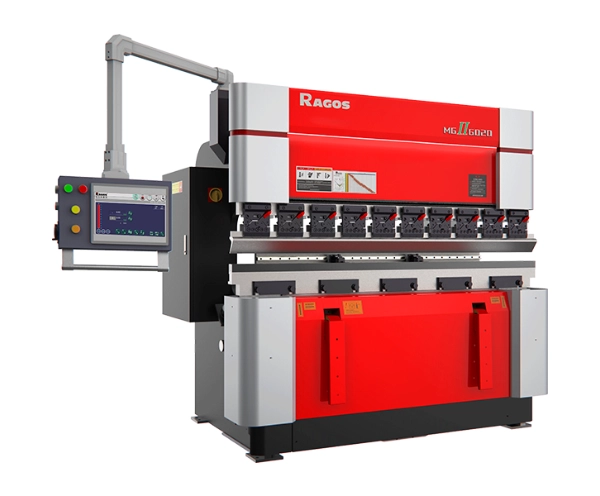


Frein à pression Cybelec CT12: Comment programmer des pièces avec aisance
Programmation du frein de pression du Cybelec CT12 devient beaucoup plus facile lorsque les opérateurs comprennent la logique derrière la création des pièces, Séquençage de courbure, et flux de travail de correction. À JS RAGOS, nous considérons ce contrôleur comme une solution pratique pour les fabricants qui ont besoin de performances de courbure 2D stables sans ajouter de complexité inutile à la production quotidienne. L’objectif n’est pas seulement de créer un programme, Mais créer un modèle rapide à éditer, Facile à répéter, et fiable sur le sol.
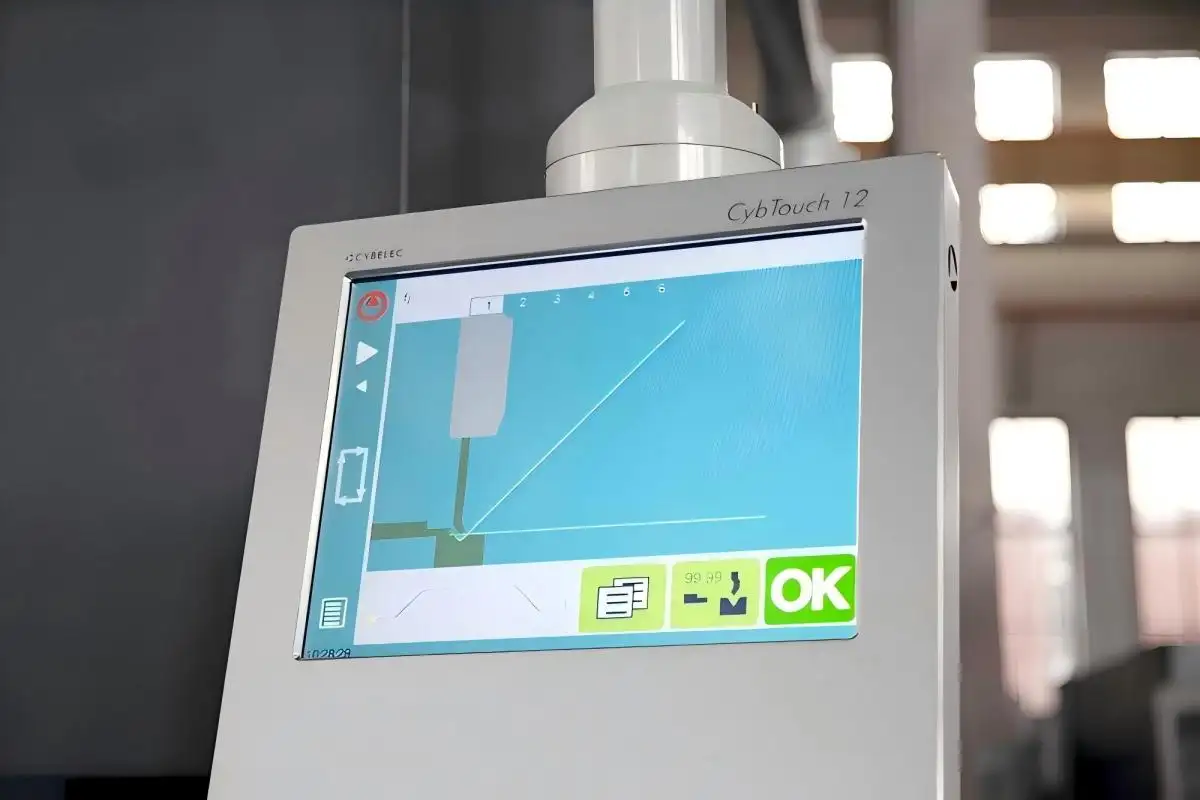
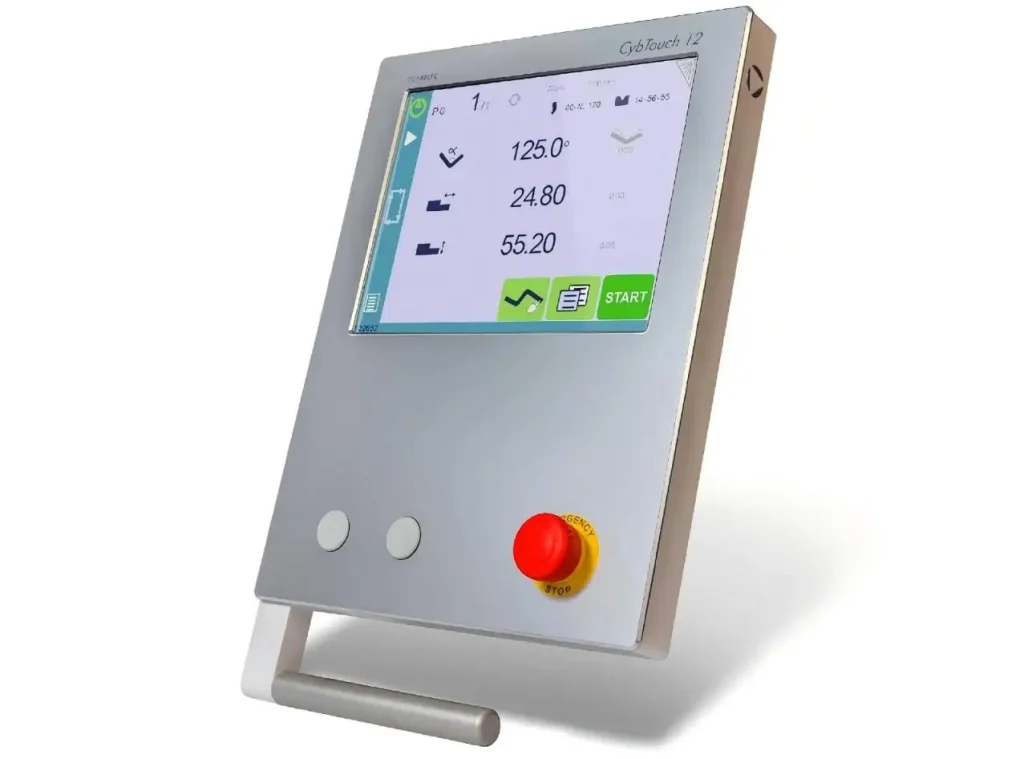
Cybelec indique que le CybTouch 12 ch est conçu pour des freins à pression synchronisés sur 4 axes, et le contrôleur combine une interface tactile couleur avec des fonctions intégrées qui guident les opérateurs pendant la programmation et le bending. Le manuel d’utilisateur officiel de CybTouch confirme également trois principales façons de créer un programme de pièces: TouchProfile Mode, Mode numérique, et mode L-Alpha.
Pourquoi le frein à pression Cybelec CT12 est important dans la fabrication moderne
Comme les fabricants de tôlerie doivent répondre à des exigences plus élevées de répétabilité, Délais plus courts, et une production en plus petit lot, La vitesse de programmation est devenue plus importante. Grand View Research indique que le marché mondial des machines-outils vaudra 97,9 milliards de dollars en 2024 et atteindra 137,4 milliards de dollars d’ici 2030. Cela montre que les gens investissent encore dans des outils qui rendent les choses plus efficaces et précises.
C’est important pour de nombreux acheteurs car un système de contrôle fait bien plus que simplement faire fonctionner la machine. Cela a aussi un effet sur:
• La rapidité avec laquelle un nouvel opérateur peut apprendre le flux de travail
• La facilité avec laquelle un programme de pièces peut être corrigé sur place
• La régularité avec laquelle la machine gère les commandes répétées
• La fluidité de la programmation supportant les tâches à court terme et personnalisées
JS RAGOS estime que le frein à pression Cybelec CT12 est utile car il aide à combler l’écart entre un contrôle facile à utiliser et un contrôle de qualité de série. Au lieu de forcer les opérateurs à ne travailler qu’avec du code, Cela leur donne différentes façons de fabriquer la même pièce selon leur niveau de compétence et les besoins du poste.
Trois voies de programmation qui rendent le frein à pression du Cybelec CT12 flexible
L’un des points forts du Cybelec CT12 Press Brake est qu’il ne lie pas chaque utilisateur à une seule habitude de programmation. Selon la documentation utilisateur de CybTouch, Les opérateurs peuvent créer des programmes de pièces en trois modes différents.
Mode TouchProfile pour une programmation visuelle rapide
Ce mode est souvent le point de départ le plus intuitif. L’opérateur dessine le profil directement à l’écran, puis ajuste la longueur et les angles des segments en touchant le graphique. Cette méthode fonctionne bien pour les utilisateurs qui préfèrent penser en formes plutôt qu’en tables.
Les clients peuvent en percevoir les avantages pratiques de plusieurs manières:
• Il permet une intégration plus rapide pour les opérateurs moins expérimentés
• Il permet une vérification plus claire du profil avant le début du processus de flexion
• Il renforce la confiance lors de la vérification de la géométrie à l’écran
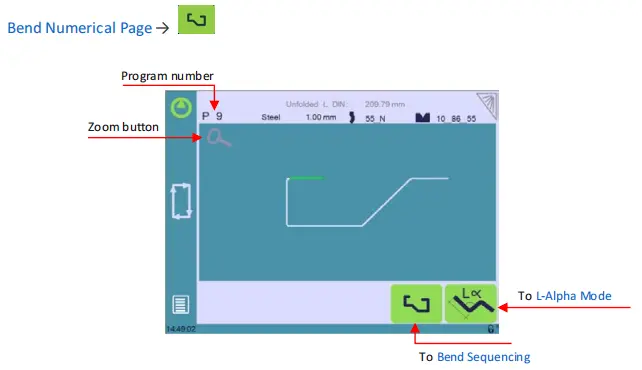
Pour les ateliers produisant plusieurs designs personnalisés, Cette méthode visuelle peut rendre la programmation plus gérable et aider à réduire le temps de configuration.
Mode numérique pour une saisie directe et efficace des données
Ce mode est particulièrement efficace pour les opérateurs déjà familiers avec la séquence de flexion requise, Paramètres d’angle, et longueurs de bride. Au lieu de dessiner la partie, Le programme est construit directement sur la page de courbure via des entrées numériques.
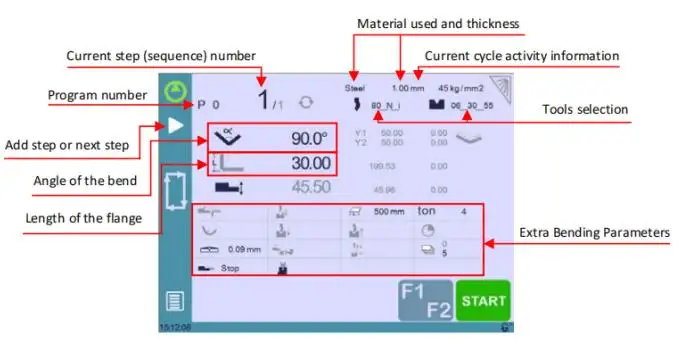
Cette méthode profite aux clients qui en ont besoin:
• Entrée plus rapide pour les pièces répétées standard
• Contrôle clair des valeurs de courbe par courbe
• Montage simple lorsque seules une ou deux dimensions changent
Dans les environnements de production où les mêmes familles de composants apparaissent souvent, Ce mode peut soutenir une routine très efficace.
Mode L-Alpha pour la définition de profil structuré
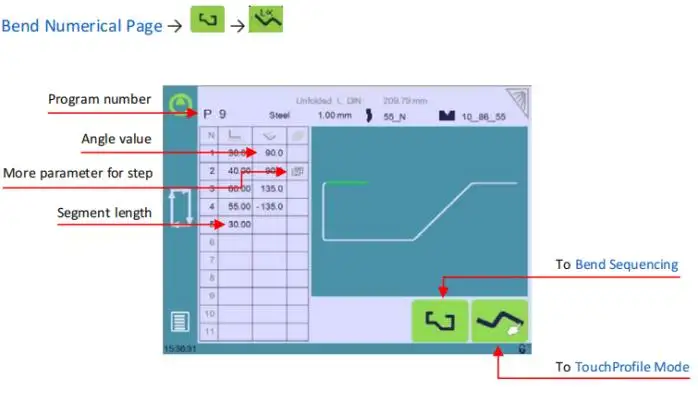
Comme indiqué dans le manuel CybTouch, la page L-Alpha peut être activée dans les paramètres, permettant d’entrer les étapes de profil sous forme de tableau. Cette mise en page convient bien aux utilisateurs recherchant une méthode plus structurée et facile à suivre pour saisir les données de longueur et d’angle.
À JS RAGOS, Nous considérons souvent ce mode comme un terrain d’entente solide. C’est plus organisé que le dessin libre, mais tout de même plus facile à interpréter que la programmation codée complexe.
Comment construire un meilleur programme de pièces dès le départ
Un programme réussi commence avant même que le premier virage ne soit entamé. Le matériel source que vous avez fourni souligne correctement que la machine doit déjà être opérationnelle, avec des outils, matériaux, et paramètres configurés avant le début de la programmation des pièces. Ce point est essentiel car la qualité du programme dépend beaucoup de la discipline de mise en place.
Un flux de travail sonore suit généralement cet ordre:
• Sélectionner le matériau et entrer correctement l’épaisseur
• Confirmer la combinaison poinçonnage et matrice avant de programmer
• Choisir le mode de programmation préféré en fonction du type de tâche
• Définir les longueurs de courbure, Angles, et la séquence est claire
• Réviser les positions de la jauge arrière avant le premier virage de test
Cette séquence aide les opérateurs à éviter l’un des problèmes les plus courants dans le travail sur frein à pression: corriger un programme inexact parce que les données de configuration étaient incomplètes dès le départ.
Pour les clients, Cela se traduit par une valeur pratique. Un meilleur processus d’installation signifie moins de ferraille, Moins de courbes d’essai, et une production plus stable selon les shifts. C’est pourquoi JS RAGOS ne considère pas la sélection de contrôleur comme une fonctionnalité isolée. Nous le considérons comme faisant partie de l’utilisation complète du frein à pression.
Le séquençage et les corrections de courbure sont là où la véritable efficacité apparaît
Programmer une pièce n’est que la première étape. La véritable efficacité en atelier apparaît lorsque l’opérateur peut affiner les résultats sans reconstruire l’ensemble du programme.
Le manuel d’utilisation et les matériaux produits du CybTouch montrent que le système prend en charge le séquençage de la flexion, Réglage de l’écartement arrière, et la logique de correction au sein du flux de travail de programmation. Le contrôleur prend également en charge le guidage de l’opérateur via l’interface tactile et les fonctions d’aide en ligne.
Pratiquement, C’est important car le pliage reste rarement parfait du premier coup. Variation des matériaux, Retour à l’eau, et le positionnement influencent tous le résultat. Le processus de correction devient donc partie intégrante de la production normale, Pas un signe d’erreur d’opérateur.
Les principaux domaines de correction incluent:
• Correction d’angle sur l’axe Y, ce qui aide à affiner la précision des flexions
• Correction de couronnement, qui soutient la cohérence d’angle sur toute la longueur de flexion
• Correction des axes X et R de la rétro-écartement, ce qui améliore le positionnement des brides
• Fonctionnement semi-automatique, ce qui permet de répéter les ajustements jusqu’à ce que le résultat soit acceptable
Pour les clients, Ce ne sont pas seulement des caractéristiques techniques. Ce sont des garanties de production. Ils aident à réduire le gaspillage de matériel et à améliorer les taux d’approbation des premières parties, Surtout lorsqu’on passe d’un matériau à l’autre ou que lorsqu’on manipule des géométries plus exigeantes.
Logique de la partie suivante, Transfert hors ligne, et les avantages de la production quotidienne
Un autre concept utile dans le matériel fourni est la fonction Next-Part, ce qui permet à un programme d’appeler automatiquement le suivant. Cela est particulièrement précieux lorsqu’un assemblage fini nécessite plusieurs pièces liées ou lorsque la production nécessite une séquence continue à travers plusieurs programmes simples.
Le manuel CybTouch décrit également la gestion des programmes et les fonctions de transfert de fichiers, y compris le stockage, Chargement, et des outils de conversion pour des flux de travail compatibles. Ces capacités sont importantes car la fabrication moderne dépend de plus en plus de la répétabilité, pas une programmation ponctuelle.
Du point de vue du client, Les avantages sont pratiques:
• Meilleure continuité dans la production en lots
• Réutilisation plus facile des programmes de pièces éprouvées
• Organisation plus simple des emplois récurrents
• Réduction de la dépendance à la saisie répétée des mêmes données
À JS RAGOS, Nous recommandons ce type de solution de contrôleur aux fabricants qui souhaitent qu’un frein à pression soit à la fois productif et accessible. Le meilleur système de contrôle n’est pas celui qui possède la liste de fonctionnalités la plus longue. C’est celle qui aide les opérateurs à passer du dessin au pliage fini avec moins de délais et moins d’erreurs évitables.
Pourquoi JS RAGOS recommande un état d’esprit de programmation pratique
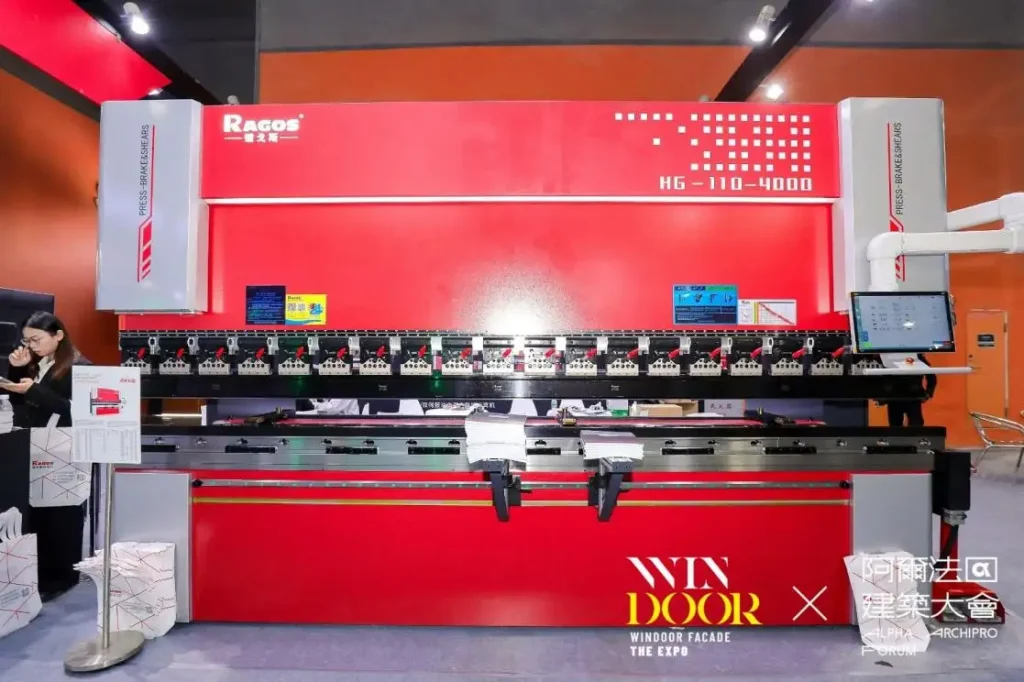
Le frein à pression de la Cybelec CT12 ne se limite pas à la commodité de l’écran tactile. Il s’agit de fournir aux opérateurs un chemin de programmation clair, Offrant aux superviseurs une sortie plus reproductible, et offrant aux acheteurs une machine qui répond aux besoins réels de production.
Pour les entreprises qui débutent pour la première fois dans le pliage CNC, Ce contrôleur offre un moyen accessible de renforcer la confiance en programmation. Pour les utilisateurs expérimentés, Il offre suffisamment de flexibilité pour rendre le travail quotidien efficace. Les informations officielles du produit Cybečlac mettent en avant l’environnement tactile 2D de la manette et la mise au point synchronisée du frein à pression, ce qui correspond bien aux besoins de nombreuses applications de fabrication standard.
Si votre équipe évalue un nouveau frein à pression ou cherche une machine qui rend la programmation plus facile à gérer, JS RAGOS peut vous aider à adapter la bonne configuration machine à la bonne stratégie de contrôle. Explorez nos ressources liées aux contrôleurs et discutez avec notre équipe pour discuter d’une solution de frein à pression conçue autour de vos objectifs de production, Niveau de compétence de l’opérateur, et exigences en pièces.